

COACHINT: what is built so far
Feature summary · version 10 · 12 October 2026
In one sentence: COACHINT reads an athlete's own training data, learns what is normal for them, and explains every day what changed and why it matters. It also puts the food they eat next to the calories their training burns. A trainer sees the same explanations for the athletes who chose to share with them. The proof of concept is feature-complete for a first pilot with 5 to 10 friends and 1 or 2 trainers; it has not yet run with real people's data.
This page lists what a user gets today (version 10 adds a sign-in page with sign-up the organiser approves, own AI keys checked when saved, Intervals.icu connected from the app, a Bio card, standard workouts, plans of up to 12 weeks, a cost log for AI use, a fourth security review and an iPad layout), how far each part has been tested, and what is still missing. The step-by-step user guide is TUTORIAL_en.md.
1. The idea in practice
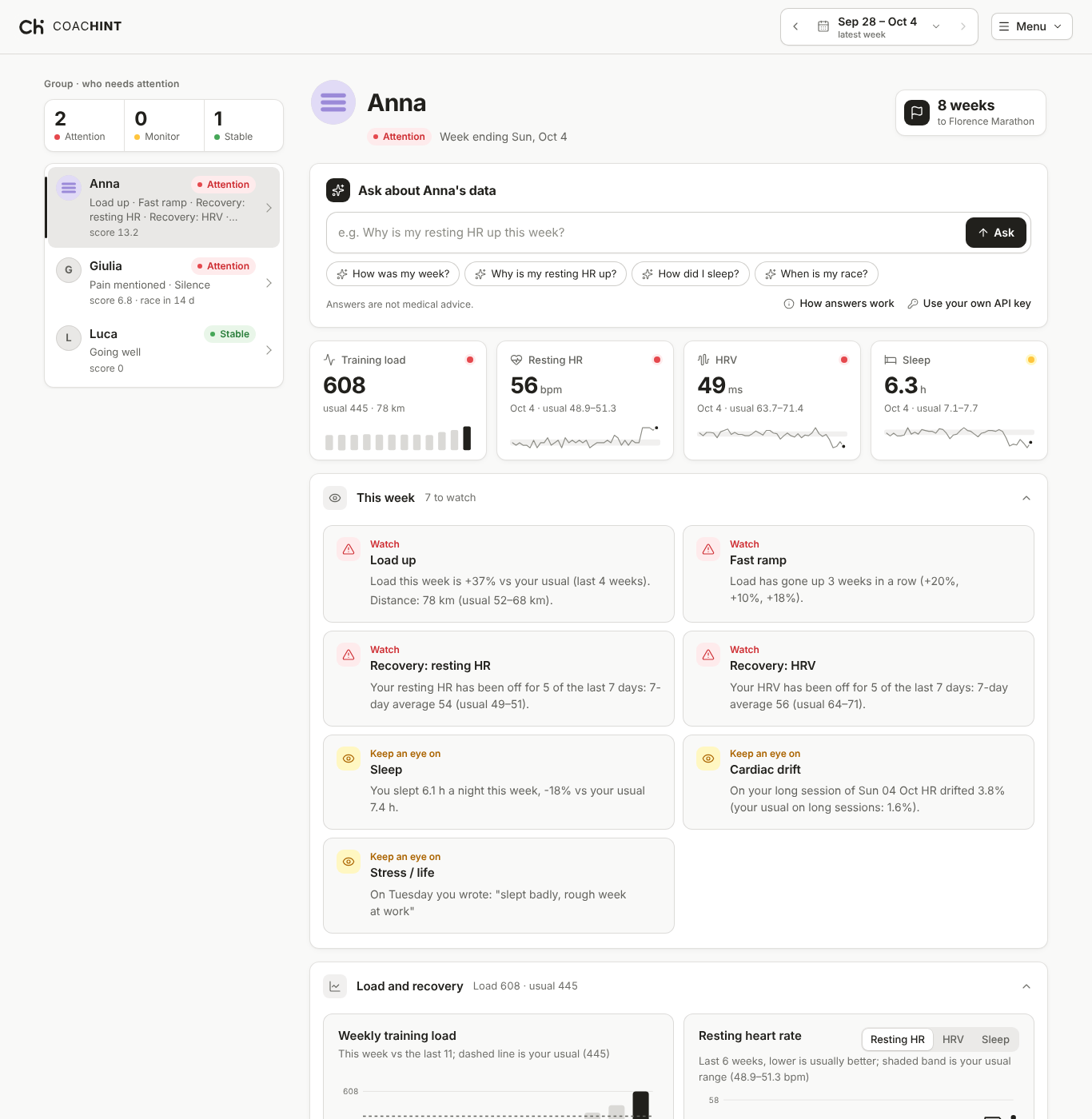
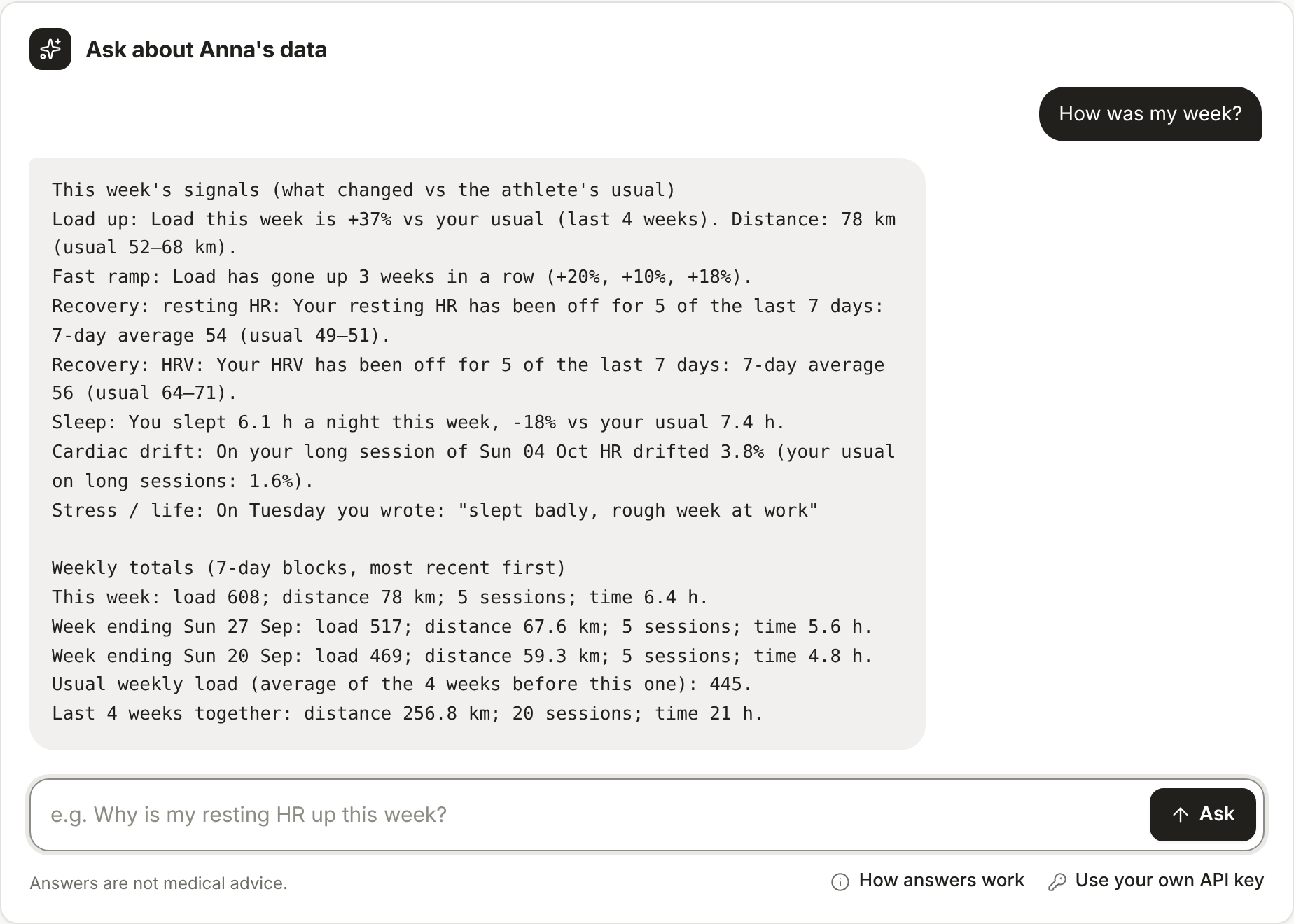
Most training apps show numbers. COACHINT tells an athlete what those numbers mean for them, compared with their own last weeks rather than a generic norm, and says why it matters ("load is 37% above your usual, three weeks of increases in a row, resting heart rate up five of the last seven days, race in eight weeks").
Three things set it apart from the many "chat with your training data" tools (see the Concept doc's competitor table):
- Many sources, one history. Garmin, Polar, Strava exports, watch files and Intervals.icu land in one timeline, with each session counted once.
- A personal baseline. Every alert compares the athlete with themselves.
- The athlete–trainer link with consent and EU-style privacy built in from the first line of code, not added later.
2. What an athlete gets
| Feature | What the athlete sees |
|---|---|
| Signals with explanations | Each week, a short list of what is unusual: training load up or down, a ramp that is too fast, missing sessions, resting heart rate, heart-rate variability, sleep, running efficiency, cardiac drift. Each one says what happened, compared with what, and why it matters. |
| Notes that count | Free-text notes ("knee sore after the long run", "stressful week at work") are read and flagged as pain, illness, stress, motivation or feeling good, in English or Italian (any language with an AI model). |
| Daily digest | The same signals as a short message every morning by Telegram or email, each alert with a Useful / Dismiss button. The verdicts are stored, so the pilot measures which alerts people value. |
| Past digests | Every digest is also kept on the athlete's page, newest first, with the same Useful / Dismiss buttons (a tap in the email or Telegram shows here too) and a link to that week. A digest can go to the app only, with no Telegram or email. Kept for six months by default, then deleted. |
| Chat with your data | The first thing on the athlete's page. Ask in any language ("How did I sleep this month?", "Quanto manca alla gara?"). Every number and date in an answer is checked against the athlete's data before it is shown; an answer that cites something the data does not have is shown with a warning naming it. Answers name the model that wrote them. Training suggestions are allowed, with a "not medical advice" note. |
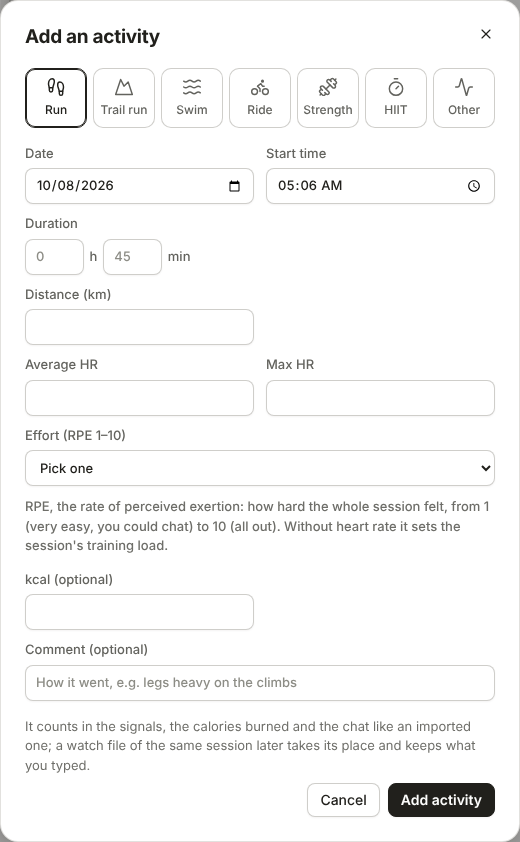
| Add or fix an activity by hand | For sessions without a watch: a short form per sport (run, trail run, walk, hike, swim, ride, strength with exercises and sets, HIIT with rounds, or any other sport). Each form also takes equipment (with a default per sport set in Account), the weather outdoors, the planned workout, and pool lengths for a swim. It counts in the load, signals, calories, chat and digest like an imported one, and a watch file of the same session later takes its place. A wrong imported activity can be corrected too, with an undo; the page warns that the route and splits are still the watch's. |
| Everything can be opened, edited or removed | Every activity of the week opens its details. Activities, notes, food entries, races and past digests can be edited or removed; each removal asks first. An imported activity that is removed is only hidden, listed under Removed by you with Bring back, and a note sent by a service can be edited with an undo. |
| Training plan | Make a training plan drafts from one to twelve weeks of sessions, from any day up to a year ahead, from the athlete's own data (with the chat's AI model, or from their usual week when no model answers). Every session can be changed, moved to another date or dragged to another day (with Undo) before saving it to the calendar. Standard workouts adds sessions tested in sports science, each with its study, in one press; people save their own and share them. On a phone each session is one line until tapped open. The plan goes on a Garmin watch as workout files, or into any calendar (Polar included) as a calendar file, and can be sent by email, Telegram or the phone's share menu. Afterwards the calendar ticks or crosses out each planned session and says how much of the plan was done. |
| Races and events | The races the athlete trains for, with priority (A goal, B important, C training), date, place, distance and a link. They can be typed in or found by name in Wikidata (free, open data) and checked before adding. The next race drives the countdown, race-week signals and the chat. |
| Activity details | For each workout from a watch file: the route on a map, pace, heart rate and elevation along the distance, and kilometre splits. Others never see the first and last 200 m of a route (where people live). |
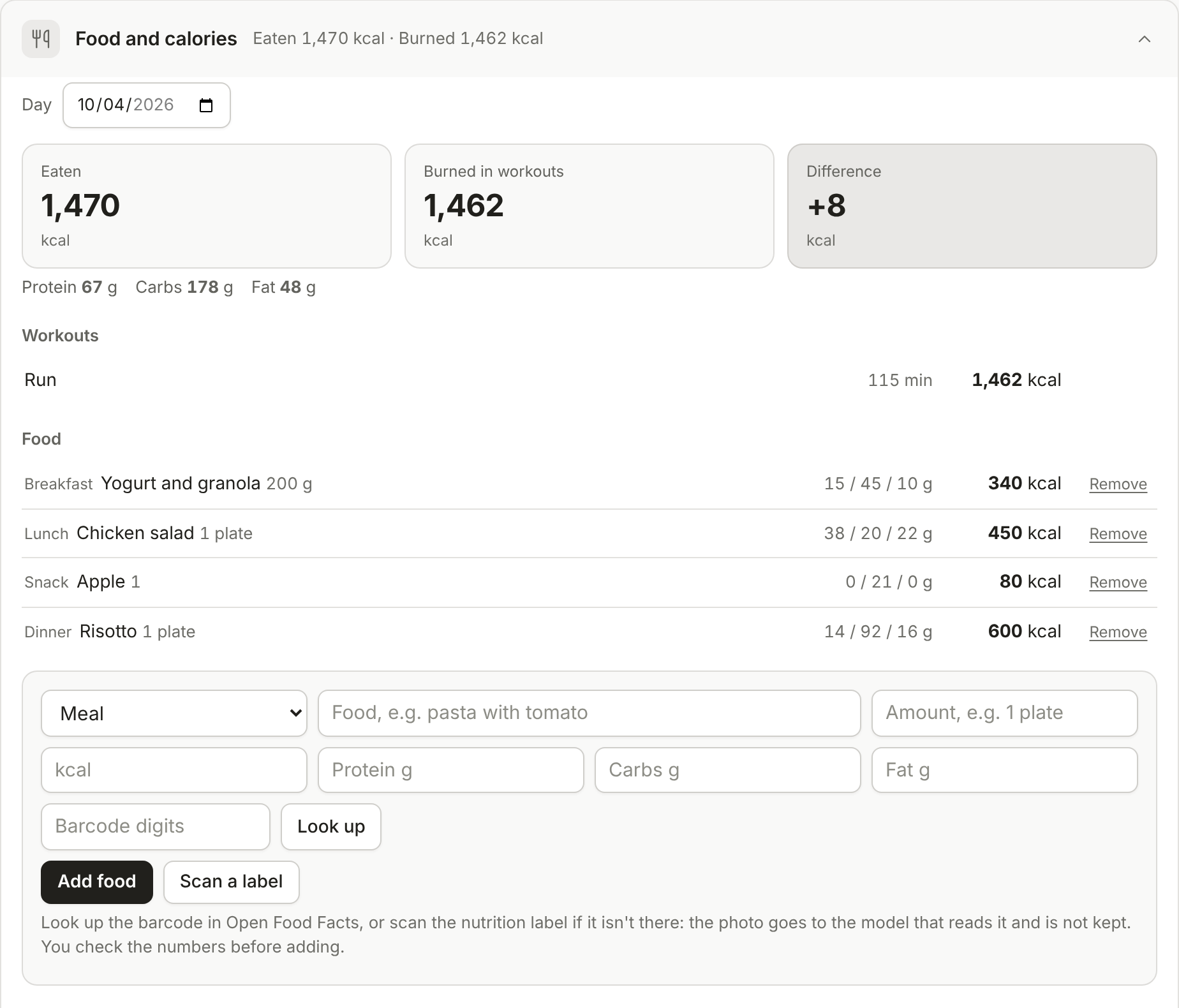
| Food and calories | A food log next to the calories that day's workouts burned, and the difference, for the day and the week. A food can be typed in, found by its barcode in the free Open Food Facts database, or read from a photo of the nutrition label by a low-cost AI model; the athlete checks the numbers before adding them. Burned calories come from the watch when it sends them, otherwise they are estimated and marked as such. |
| Calendar | A month of activities and races (a week on a phone), opened under the athlete's name. An activity opens its details, a race shows its own; tapping a day adds an activity or a race with that date already filled in. |
| Opens on this week | The page opens on the week ending today, not on the last week with data, and the sections can be dragged into each person's own order. |
| Charts and history | Weekly load and recovery against the athlete's own usual range; step back week by week to see when a signal first appeared. |
| Own account | Profile picture (twelve avatars or a photo), weight and height (used for calorie estimates), own AI key (checked with the provider when saved, with links to where to get one), a short bio shown on their Bio card (with sport, heart-rate range, next races and what they share, as far as its level reaches), which sections to show (races, food and past digests can be hidden; races and past digests start hidden, and hidden data still feeds the signals and chat), a page listing who can see their data, Download my data, and Leave, which deletes the account and everything in it. |
| Sources for every estimate | Each estimate (training load, the effort scale, calories per sport and per km) has a Sources line that opens the published studies behind it, so a coach or a sceptical athlete can check where a number comes from. |
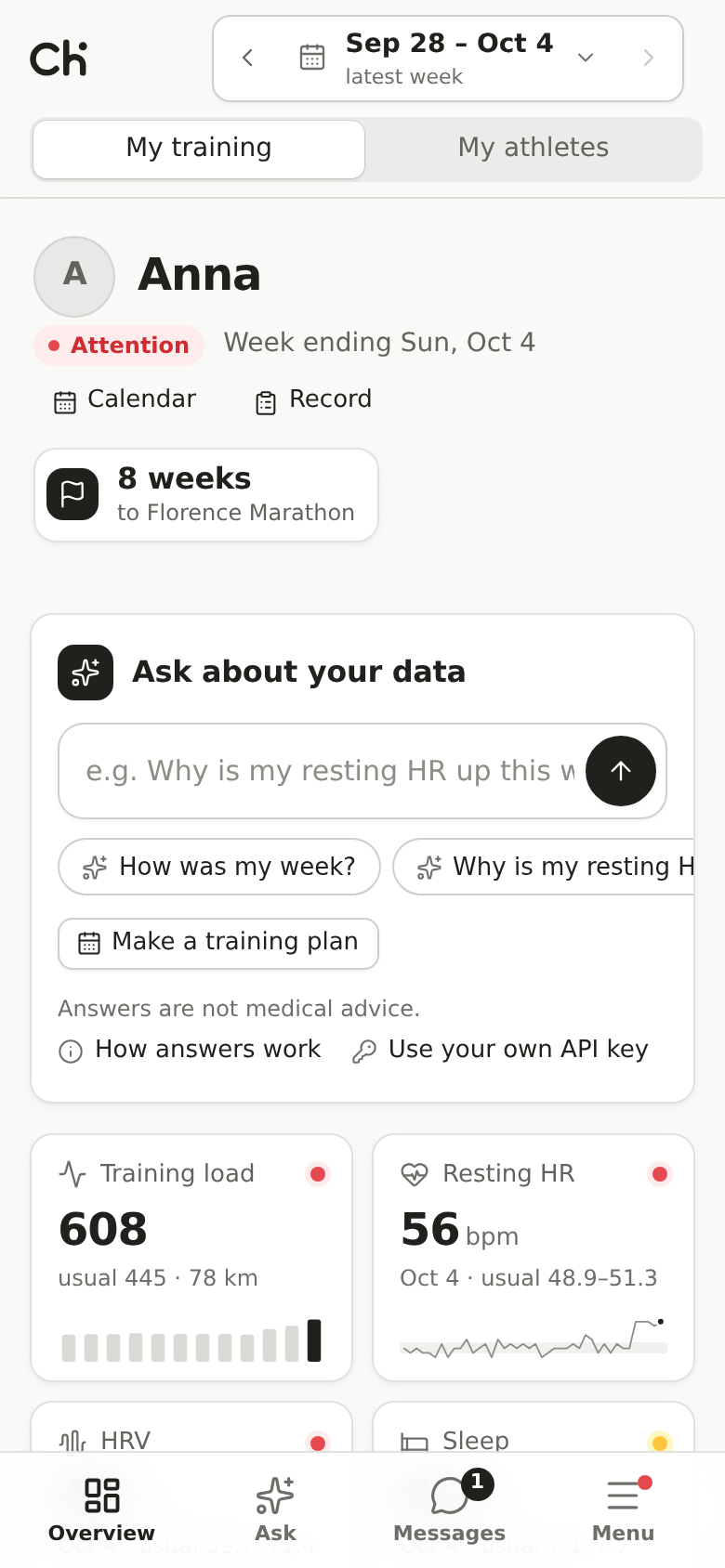
| A page that feels like an app | The chat at the top, then four key numbers (training load, resting heart rate, HRV, sleep) with a small trend chart each, then sections that open and close with a one-line summary (this week, load and recovery, activities, races, notes, food, digests) and an Expand all / Collapse all button, and one Menu for everything else. A calm grey look where colour only means something: red Watch, amber Keep an eye on, green Going well. On a phone a bottom bar switches between the athletes, the overview, the chat, messages and the menu, and dialogs slide up from the bottom like a native app. A guided tour lights up one part of the page at a time and explains it. |
| Tablet | On an upright iPad the athlete list and the athlete's page sit side by side, with the touch bar kept. |
| Phone app | The site installs on Android and iPhone home screens as an app (own icon, full screen). An Android app file can be built from the same site. No app store needed for the pilot. |
| People and connections | A People page with a profile card (sport, place, a line about them) that stays private until the person makes it discoverable; search by name, sport or place, a few suggestions, and requests the other side accepts or declines: ask a trainer to coach you, offer to coach an athlete, invite someone into a group. Anyone can make or leave a group. Search never shows anyone's data. |
| Messages | Write to the people you are connected with, and one conversation per group for its members and trainers, with the unread count on a Messages button in the top bar. Messages leave with a deleted person. |
| Athlete record | Medical history, injuries and past race results (time, outcome, category place, conditions, a link to the results). Private by default; health sections can be shared only with coaches, each with its own explicit consent. |
| Feed | Each activity, race and record section has a level: private (the default), coaches, connections, or everyone signed in. A Feed tile lists what contacts let the viewer see, newest first; people can clap once and comment, and the owner removes any comment. |
| Notifications, blocking and reports | Claps, comments and connection requests show as notifications in the app, and unseen ones (and unread messages) can be sent by Telegram or email without their text. Anyone can block anyone, which hides them both ways everywhere, and report a person, a comment or a message to the admin. |
| Five languages | English, Italian, Spanish, French and German, chosen from the browser. Adding a language is one translated file. The chat, coach chat and training plans answer in the page's language. |
3. Bringing data in
The platform deliberately uses only routes that are allowed by each provider's terms and that work for individuals today.
| Source | How it arrives | Why this route |
|---|---|---|
| Garmin | The athlete's own Garmin Connect data export, or Garmin synced to Intervals.icu | Garmin's API is for approved companies only and was closed to new sign-ups in 2026 |
| Polar | Polar's AccessLink API with the athlete's consent (daily sync), or a Polar Flow export | AccessLink is open and free for individual developers |
| Strava | The athlete's own bulk archive only | Strava's API terms forbid AI use and showing data to coaches |
| Intervals.icu | The athlete connects their own account in the app (athlete ID and key); activities and wellness sync every 10 minutes, with Sync now and Disconnect | Works with most watches; activities it got from Strava are skipped |
| Files | FIT, TCX, GPX and CSV uploads, from the page or the command line | Every device can produce one |
The same session arriving from two sources (say Garmin and Strava) is counted once, keeping the richest file and the athlete's comment.
4. What a trainer gets
| Feature | What the trainer sees |
|---|---|
| Group view | The athletes of the groups they follow, ranked Attention / Monitor / Stable, with the reasons next to each name and the days to each athlete's next race. |
| Athlete pages | The same signals, charts, notes, activities, food log and past digests the athlete sees. |
| Several coaches per athlete | An athlete can have more than one coach: the trainers of their groups plus any trainer they pick themselves on their Sharing page or the People page (a trainer can also offer, and the athlete accepts). Picking a coach is the athlete's consent; removing one takes effect at once. |
| Coach who also trains | One person can be both: My training shows their own page as an athlete, My athletes the people they coach. |
| Coach chat | A conversation with the AI about one athlete, worded for a coach and kept for next time, with the same number check. Only that trainer reads it. |
| Send a plan | A coach drafts a training plan for an athlete and sends it; it waits at the top of the athlete's page until they change and save it, or decline it. |
| Private notes | A coach keeps their own notes about each athlete, seen by no one else (not the athlete, not other coaches) and deleted with the athlete. |
| Consent first | A trainer sees an athlete only after the athlete agrees (or picks them as a coach) on their own Sharing page; the athlete can stop at any time. The organiser can see who coaches whom but cannot change it. |
5. Running a pilot (the organiser's tools)
| Feature | What it does |
|---|---|
| Sign-in | A landing page with a short intro, sign-in with a user name and password, and Create an account after accepting the terms (or Google or any standard login provider). An optional email allows password resets. New accounts wait until the organiser approves them, then start as athletes in no group; an athlete can ask to become a coach. |
| Terms of use | Everyone accepts the current terms and gives a separate explicit consent for health data before seeing anything, and again when the terms change. Draft text in English and Italian, still to be reviewed by a lawyer. |
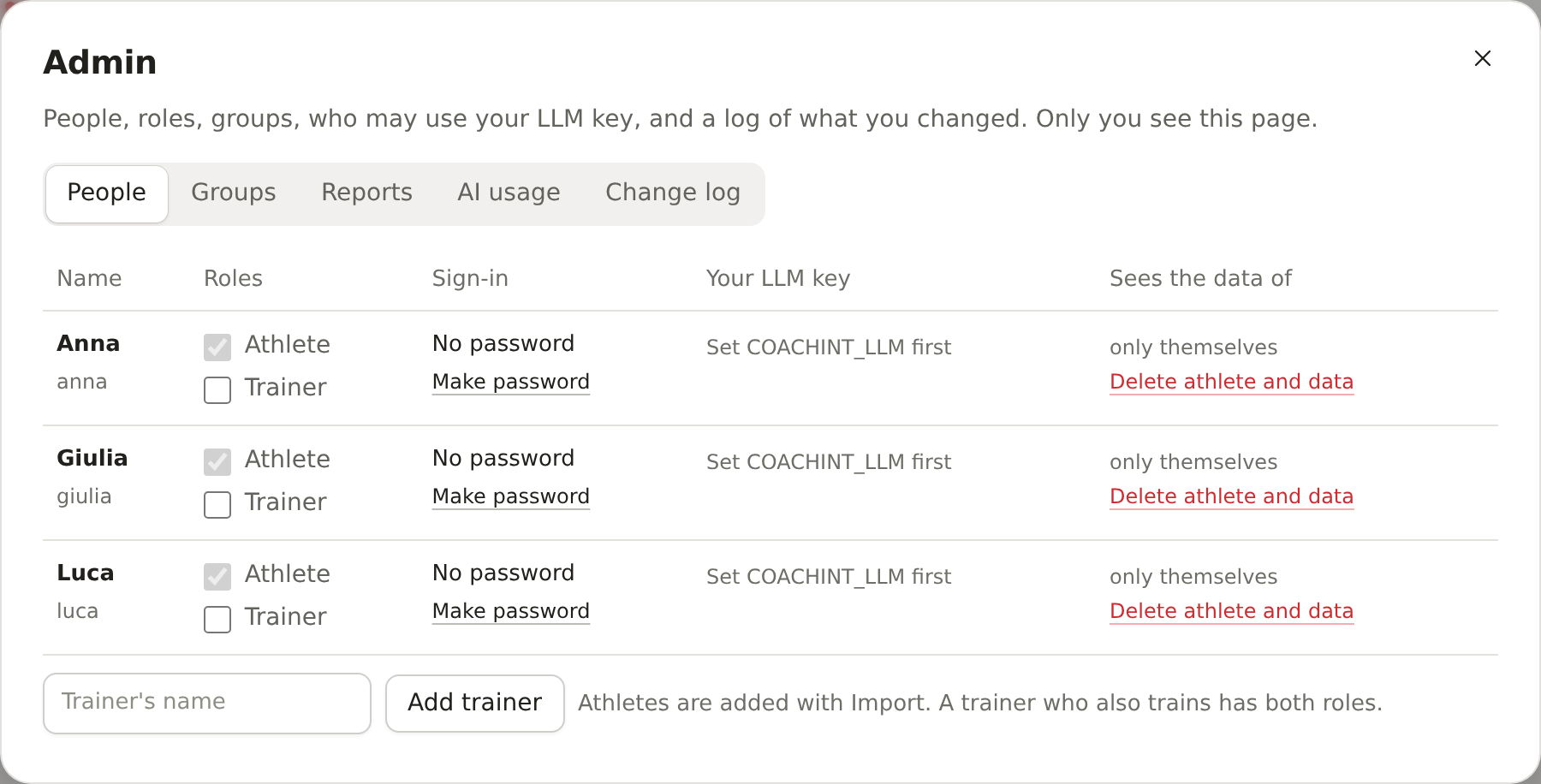
| Admin panel | Add trainers, set each person's roles (athlete, trainer or both), build groups (with or without members seeing each other), reset or block logins, and grant use of the organiser's AI key up to a monthly number of questions per person. Sections are tabs, with counts for people waiting and open reports. AI usage logs every model call (who, what for, model, tokens, estimated cost, never the text); on the organiser's key each person has a daily quota and the site a monthly budget, while people's own keys are never limited. |
| Change log | Every admin change is recorded with the time (names and ids only, never passwords or health data). |
| Delete an athlete | Removes all of a person's data, logins, keys, connections and sent digests in one step, and revokes their Polar access. |
| Shareable online demo | One self-contained web page with three synthetic athletes and a "Play" bar to switch between the admin, a trainer and each athlete. Visitors can add, edit and remove activities, notes, food and races there too, kept only in their browser. Nothing to install. |
| User manual and docs site | A short plain-language manual (English and Italian) next to the tutorial and this summary, built as a small documentation website. |
| Hosting | Runs on a free alwaysdata account, or as a container on any cloud server or home hardware (Docker or Podman, with HTTPS). A step-by-step guide covers a small Hetzner Cloud server in Germany or Finland (about €7 a month plus VAT), which can set itself up on first boot and takes nightly encrypted backups. |
6. Privacy and trust
These are product features, not only compliance items, and they support the "EU privacy" positioning.
- Each person sees only their own data unless they consent to a trainer or a sharing group; the organiser cannot consent for them. These rules are written once and checked by an automated table of who can do what.
- Download and delete: every person can export all their data and delete their account themselves.
- Encrypted database (AES-256) on the hosted site; passwords stored with a modern hash (Argon2id).
- AI answers are checked against the data: every number and date in an answer is compared with the person's data, and an answer that cites something the data does not have is shown with a clear warning naming it.
- Bring your own AI key: a person's questions are paid with their own key, the organiser's key only when granted, otherwise an open model that can be hosted in the EU. The athlete's data is sent to the AI provider only when a model is used; this is stated in the terms.
- Outside lookups send as little as possible: a race search sends only the words typed to Wikidata, a barcode lookup sends only the barcode to Open Food Facts, and a label photo is shrunk on the phone, read once and not kept. The food log is the athlete's own data like the rest: downloadable and deleted with the account.
- No Strava API, no Garmin company API: nothing that depends on a platform's goodwill or breaks its terms.
- Four security reviews have been done, the latest adding limits per person on password-reset emails, key checks and Intervals.icu syncs; open risks are tracked in
deploy/SECURITY.md.
7. Engineering quality (in brief)
The code is a Python application with a single web page, a small set of dependencies under permissive open-source licences (MIT, BSD, Apache, PSF), and an automated test suite that runs on every change, including tests against a small open AI model. The look uses two open-source design libraries (Radix Colors and Lucide icons, MIT and ISC licences) copied into the page, so nothing loads from other sites. In early October a hardening round replaced hand-written security code with standard libraries, sped up page loads and moved the number crunching to a faster data engine, with every number the app shows pinned by tests so nothing moved. A later pass made the site start about twice as fast and fit a free 256 MB host: measured with 30 athletes and two years of data each, it takes about 85 MB once started and about 105 MB while busy.
8. Honest status: what has not happened yet
Everything above is built and tested, but only on synthetic data and simulated services. These are the gaps:
| Not yet done | Why it matters |
|---|---|
| The site has never been deployed live (the alwaysdata and Hetzner guides have not been run), and no real person has used it; tests now run it as a real server on an encrypted database, with restarts and concurrent writes | Usability, value and hosting cost are unproven |
| No real Garmin, Strava or Polar export, Polar account or Intervals.icu key has been used, and no plan has been loaded on a real watch | Real files may differ from the test ones |
| No real Telegram bot or mailbox has sent a digest | Delivery and the Useful/Dismiss signal are unproven |
| No real Anthropic or OpenAI call has been made from the app (only a small open model in tests) | Cost per question and answer quality are unmeasured; the new usage log will measure them in the pilot |
| No real food barcode lookup, label photo or Wikidata race search has been tried (tested against the services' documented or recorded answers and a simulated AI model) | Label reading accuracy, its cost and how many races Wikidata knows are unknown |
| The phone app has not been installed on a real phone; barcode scanning from a photo works only in Chrome on Android (iPhone users type the digits) | Should work (the browser reports it installable), unverified |
| Terms of use are a draft (now covering the athlete record, the Feed and reports); no lawyer has reviewed them; no formal health-data (GDPR) assessment | Required before data from people outside the friends' pilot |
| Spanish, French and German were written by an AI model | Need a native speaker's read |
| Alert thresholds are starting values from the MVP doc | To be calibrated with pilot feedback |
9. Next steps
The plan is a two-week pilot: go live with the organiser's own data, then invite 5 to 10 friends and 1 or 2 trainers following small groups (one group with sharing on), with the daily digest and its Useful/Dismiss feedback as the main measure.